



Start Designing for Free!
By Bliss & Bone
August 2026
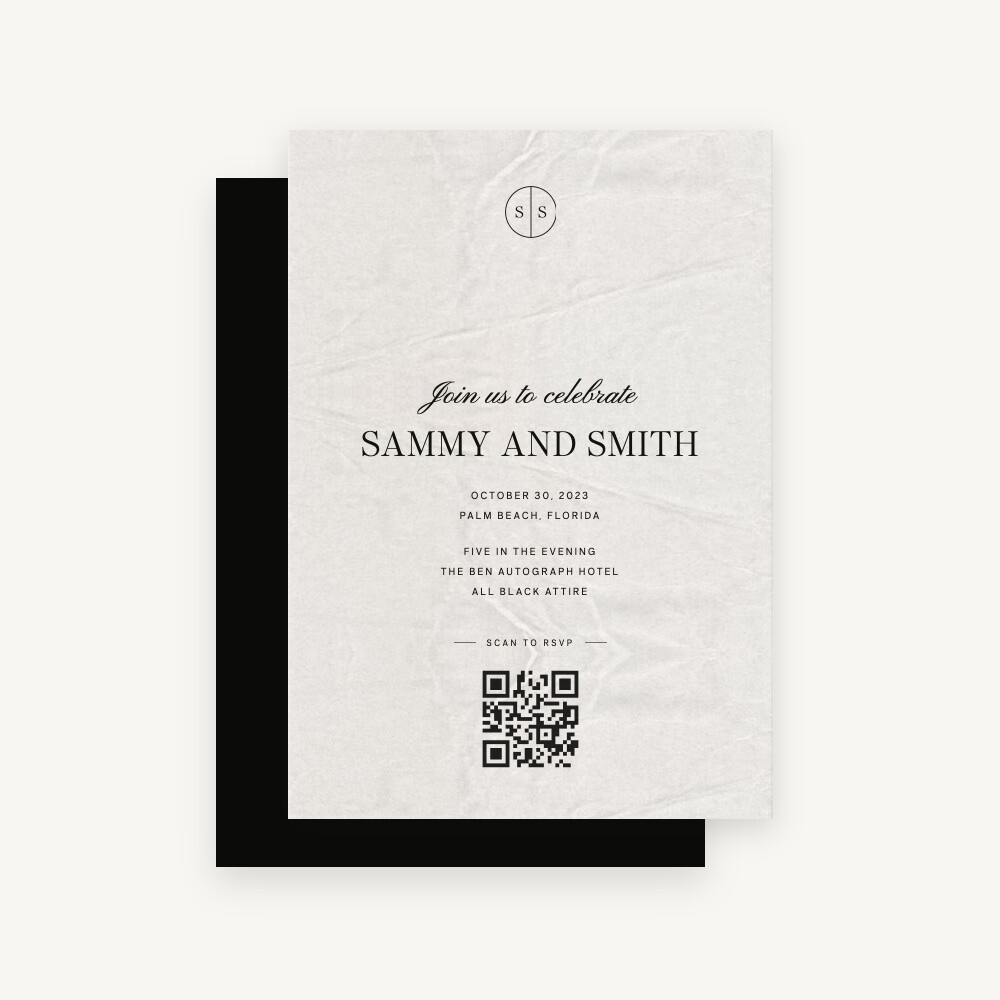
A wedding invitation QR code is a printed square that opens your wedding website when a guest points a phone camera at it. You make one free in about two minutes by pasting your website address into a QR generator and downloading the image. Print it at 0.8 inches or larger, dark on a light background, and it will scan.
Yes, and at this point it is closer to standard than to novel.
"More than half the printed suites we produce now carry a QR code somewhere in the stack," says Cindy Skanderup, creative director at Bliss & Bone. "Two years ago it was a request. Now it is something we lay space for at the design stage."
The question stopped being whether a code is acceptable and became where it goes and how large it needs to be. Wedding website addresses are awkward to type on a phone, they get transcribed wrong, and a mistyped address sends a guest to a dead page instead of your RSVP form. A code removes the typing.
The formal case against it is also real. A QR code is a piece of machine-readable graphic design sitting inside a piece of traditional typographic design, and on a fully formal suite it can look like a shipping label. Both things are true, and the resolution is placement rather than avoidance. We cover that below, and the broader question of what belongs on which card is handled in our guide to wedding invitation etiquette.
Point it at your wedding website, not directly at the RSVP form. A guest who lands on the website can find the RSVP page, the schedule, the hotel block, and directions in one place. A guest who lands cold on a form has one thing available and has to go looking for everything else. The invitation itself carries only the essentials, so the code is doing the work of every card you chose not to print. Send it somewhere that answers more than one question, because a guest who has to search twice usually stops after the first try.
There is one exception worth making. If you are printing a separate reply card and the code sits on that card alone, sending it straight to the RSVP page is the right call, because the card has already told the guest what the code is for. Everywhere else, the homepage of your wedding website is the better destination.
Avoid pointing a code at a registry, a payment app, or a photo-sharing service on the invitation itself. Those belong on day-of signage and thank-you cards, where guests expect a transaction. On the invitation, a code that opens a gift page reads as a request rather than an invitation.
Copy your wedding website address, paste it into a free QR generator, and download the result as an SVG or a PNG of at least 1,000 pixels. Choose a static code so the image encodes your address directly and never expires. The whole process takes about two minutes and costs nothing.
The code encodes whatever address you give it, so the address has to be final before you generate anything. Publish the site, open it in a browser, and copy the address from the bar rather than retyping it from memory. If you plan to connect a custom domain, do that first. On Bliss & Bone you buy the domain from any registrar you like and connect it to your site, and because you bought it, you keep it. A code generated against a domain you own stays valid no matter what happens to the platform underneath it.
Look for the word static before you click generate. Most generators offer both types and several default to dynamic, because dynamic is the version they charge for. QRCode Monkey is the one we point couples to most often: free, no account required, static by default, and the site states its codes "do not stop working after a certain time." Canva's free tier also produces static codes, though its Pro tier switches to dynamic. Adobe Express includes a QR tool if you are already designing there.
Any generator produces the same underlying code for the same address, so the choice comes down to the download formats offered and whether you are being handed a static code or a redirect. The section on static and dynamic codes below explains why that distinction decides whether your invitations still work in a year.
Ask for SVG if the generator offers it, and PNG at 1,000 pixels square or larger if it does not. An SVG scales to any print size without softening the edges of the squares, which is what a scanner reads. A screenshot of a QR code on a screen is the single most common reason a printed code fails, because the resolution is far below what a press needs.
A shorter address produces a code with fewer, larger squares, and larger squares survive small print sizes and ink spread. oursite.com/rsvp generates a visibly simpler pattern than a long address with tracking parameters attached. Strip anything after the essential path before you generate.
Open the downloaded file at the size you intend to print it and scan it with two different phones. Then check that the page it opens is the page you meant, on mobile, with the RSVP form working. Full testing routine is in the section below.
You mostly cannot take one with you, which is worth knowing before you count on the feature. Zola's help center states that Zola QR codes "cannot be added directly to the wedding website or be downloaded to use on non-Zola paper at this time." The Knot's is equally direct: "we cannot generate a QR code for you to share with friends directly." Both generate codes inside their own stationery editors, for products their own presses print. It is a feature of the print shop rather than a feature of your wedding.
If you have already bought invitations from one of them, use their tool. It is faster than making your own and the printed result is identical. The limit only bites when you want the code somewhere their press does not reach, and that is most of a wedding: a welcome sign, a menu, a hotel-block card, invitations from a different stationer. A code you generate yourself covers all of it from one file, because QR is an open standard and any generator will encode any address into a code any phone can read. Our breakdown of what you actually get from the free wedding website platforms goes deeper on the trade-offs that come with each one.
The back of the invitation or a separate enclosure card, never the front. The front of an invitation carries the names and the date, and a code competing with that hierarchy is the version people call tacky. Traditional stationery convention keeps the invitation card itself clean, which is why an enclosure works better than the reverse of the main card on a formal suite.
On a reply card, the code goes on the front, sized to sit beside the RSVP deadline rather than under it. On a details card, put it near the wedding website address, printed out in full underneath. Guests who prefer to type should be able to.
If you use the back of the invitation, add a short line on the front pointing there. "Details and RSVP on reverse" is enough. A code nobody turns the card over to find is a code that does nothing. Our guide to everything that belongs in a wedding invitation suite covers which card carries which information.
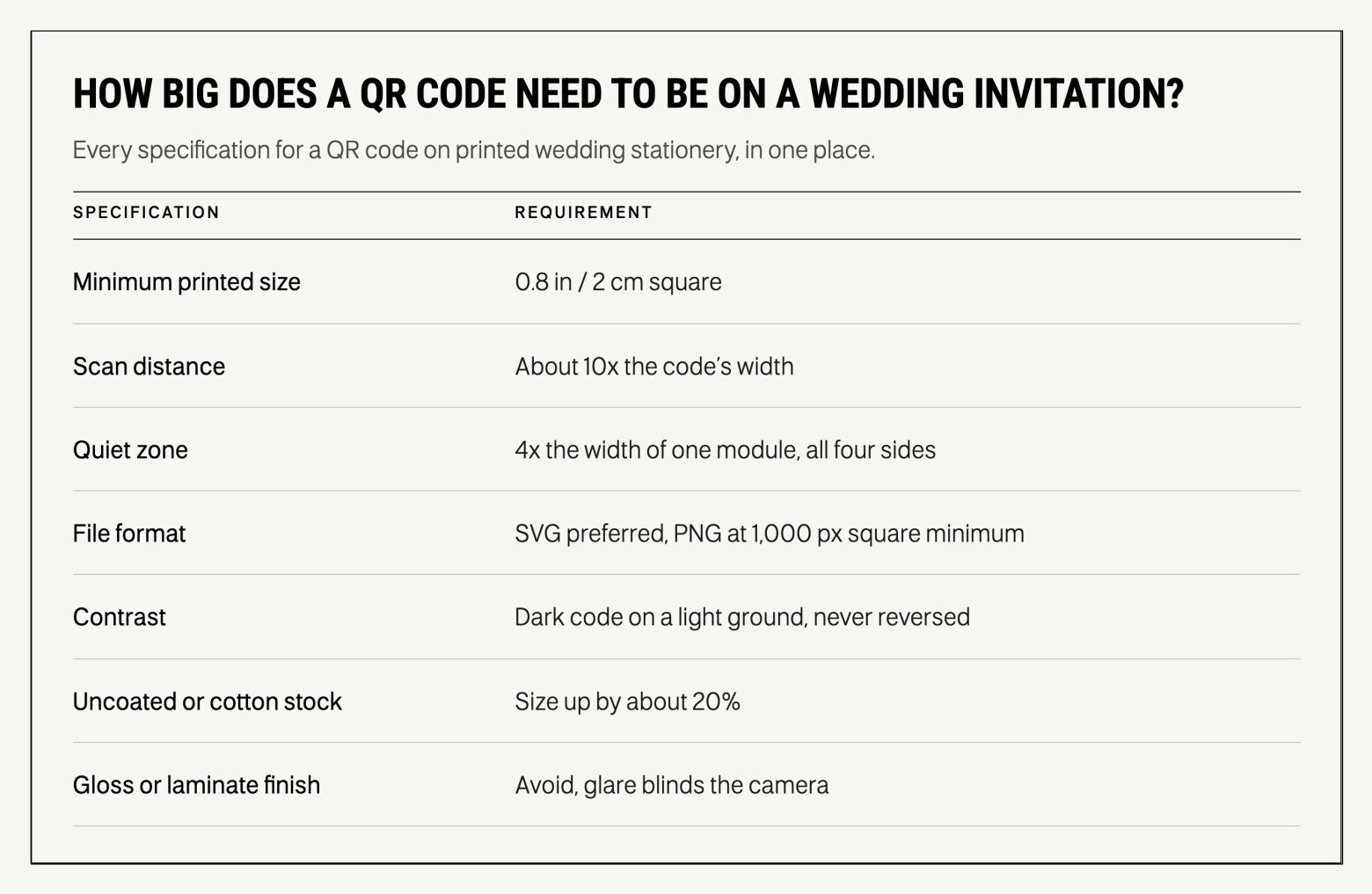
At least 0.8 inches square, or 2 x 2 cm, for a code held at arm's length. Scanning distance runs roughly ten times the code's width, so a 0.8-inch code reads from about eight inches away. Leave a clear margin around all four sides equal to four times the width of one small square inside the code.
That clear margin is called the quiet zone, and it is the requirement most often broken on wedding stationery. Designers tuck a code tight against a border or a fold, and the scanner loses the edge of the pattern. Nothing goes inside the quiet zone. No hairline rules, no border, no flourish, and no text baseline creeping up underneath it.
Contrast is the other half. Dark code on a light background, with real separation between the two. Black on ecru works. Charcoal on blush works. Taupe on cream does not, and neither does a code sitting on top of a floral illustration, however faint the illustration looks on screen. Reversing the code, light on dark, fails on many phone cameras and is not worth the risk on a print run you cannot recall.
Every specification for a QR code on printed wedding stationery, in one place.
Letterpress and foil both work, which surprises the couples who ask us and a fair number of designers. We letterpress and foil stamp QR codes on Bliss & Bone invitations and they scan. The impression depth of letterpress does not interfere with the read, and metallic foil does not confuse a phone camera the way people expect it to, as long as the plate comes from clean vector artwork and the code has room around it.
The variables that actually cause failures are stock and finish rather than technique. Heavily textured or absorbent uncoated stock lets ink spread into the white gaps between squares, which is why print guidance for absorbent substrates recommends enlarging the code by around 20% to compensate. Cotton stock, the material behind most fine wedding invitation paper, is soft and absorbent by design, so size up rather than down. High-gloss coatings cause the opposite problem: glare blinds the camera at exactly the angle a guest naturally holds a card.
Three rules cover almost every case. Supply vector artwork to your printer, never a raster image lifted from a screen. Size up on uncoated and textured stocks. Ask for a physical proof at final size on the final stock, and scan that proof before the run goes ahead. If you are ordering printed wedding invitations, a proof is the point at which a scanning problem costs nothing to fix.
A QR code collects RSVPs faster than a reply card because the guest fills out one form on a phone. No stamp, no handwriting, no mail delay, and no reply card sitting on a kitchen counter for three weeks.
A code only removes friction for guests already willing to reply online, so give them a second route anyway. Print the wedding website address in full alongside the code, and include an email address or a phone number for anyone who wants to reply to a person. The objection you will hear about older guests is genuine, and it is not about age. It is about guests who do not scan codes as a habit, and the fix costs one line of type rather than a whole second reply card. Couples in wedding forums who have done this consistently land in the same place: keep the code and print a typed address beside it.
Set the deadline where guests can see it without scanning anything. A code that opens a form is useless if the reader does not know the form closes in three weeks, and our guidance on choosing a wedding RSVP deadline explains how to work backward from your caterer's count. If you have not built the form yet, start with setting up RSVP on your wedding website, which covers the questions to ask and the ones to leave out.
Use a static code. A static QR code encodes your website address directly into the pattern, so the printed square works as long as the address works. A dynamic code encodes a short redirect instead, and every scan passes through a third-party service.
That service can change the destination later, which is the whole selling point of dynamic codes and also the reason they stop working.
Dynamic codes are tied to an account, and the account is what expires. QR Code Generator's support documentation is explicit that at the end of a free trial "only Dynamic QR Codes are deactivated" while static codes stay live. The QR Code Generator documents a harsher version: when a trial drops to the free plan, two dynamic codes survive and guests get "a 3-second advertisement before being redirected," and if the account is cancelled or deleted, "all dynamic QR codes associated with your account will stop working." No grace period. Canva draws the same line at its paid tier, where a lapsed Pro subscription means "those redirects may stop forwarding, and the code stops working."
Paying does not solve this. It converts a code that would have expired into a code that depends on you continuing to pay, indefinitely, for a wedding that already happened. The tracking analytics dynamic codes offer answer a question no couple needs answered, and the editable destination is only useful if you expect your address to change.
You can tell which kind you have without any special tools. Scan your own code and look at what the phone shows before the page loads: a static code displays your actual website address, and a dynamic code displays a short address on the generator's domain. If a code that used to work stops working, that is the first thing to check, followed by the status of the account where you made it. A static code cannot be switched off by anyone, so a static code that fails is a problem with the destination address rather than the code.
This is where the address you point at matters more than the code you generate. On most platforms your wedding website lives at an address the platform owns, something like yournames.zola.com, and upgrading to a custom domain often means buying it through the platform, which then holds it. We take the opposite position at Bliss & Bone: buy the domain yourself from any registrar, connect it to your site with our instructions, and it stays yours whether or not you stay a customer. A static code printed on 150 invitations is a permanent object. The only responsible thing to point it at is an address you control.
A save the date is the better place for a QR code than the invitation, and almost nobody says so. The save the date's whole job is to get the date onto a calendar and the guest onto your website, where travel and hotel information will appear over the following months. It carries less typographic formality than an invitation, so a code sits comfortably on it, and there is no reply card competing for the space, which is the constraint that makes invitation placement awkward.
Put it on the back of a flat card or a photo save the date, with the website address printed underneath. If you are working from save the date templates, leave a clear square in the layout at the design stage rather than dropping a code into finished artwork, which is how quiet-zone violations happen.
One caution on timing. Save the dates go out early, often a year ahead, and the code has to survive that whole window. Publish the website before you print, even if it holds nothing but your names and the date, and make sure the address is the one you intend to keep. A code pointing at a site you have not built yet is a code that trains guests to stop scanning. Browse our save the date designs if you have not chosen a format yet.
Print it at final size on the final paper and scan that. Everything else is a partial test.
A code that reads well from a laptop screen can fail at 0.8 inches on cotton stock, because ink behaves differently from pixels. Work through five checks. Scan the physical proof with at least two phones, ideally one recent and one several years old, since older cameras are less forgiving. Scan it at arm's length rather than two inches away, which is how a guest actually holds a card. Scan it in ordinary indoor light, not under a desk lamp. Confirm the page that opens is the right page and that it loads on mobile without a login. Then hand the proof to someone who has never seen it and watch them try, because a guest who does not know a code is there will not find it.
If a code fails these checks, the cause is almost always one of four things: the file was raster instead of vector, the size dropped below 0.8 inches, the quiet zone got encroached, or the contrast is lower in ink than it looked on screen. All four are cheap to fix at the proof stage and impossible to fix afterward.