



Start Designing for Free!
By Bliss & Bone
March 2026
The RSVP card is the most functional piece in your invitation suite. Its job is to collect a clear response and whatever information you need before the wedding — meal choice, dietary notes, song requests — without creating confusion or friction for guests. The wording should be direct, match the register of your invitations, and leave no room for ambiguity.
This guide covers RSVP wording for printed cards, online wedding invitations, and wedding websites, with examples for every scenario: formal and casual events, meal choices, digital sends, and how to word a graceful decline.
Every RSVP card needs four things: a response line, a name field, a deadline, and a way to respond. Meal choice, dietary restrictions, and song requests are optional — include them only if you genuinely need the information to plan the reception.
The name field matters more than most couples anticipate. Guests who receive a plus-one invitation often return the card with only one name filled in, or none at all. "Name(s): " or " of ___ seats confirmed" makes it harder to skip. The deadline should be prominent, not printed in a smaller font at the bottom. Three to four weeks before the wedding is standard. For the full timing picture, the wedding invitation etiquette guide covers the conventions in detail.
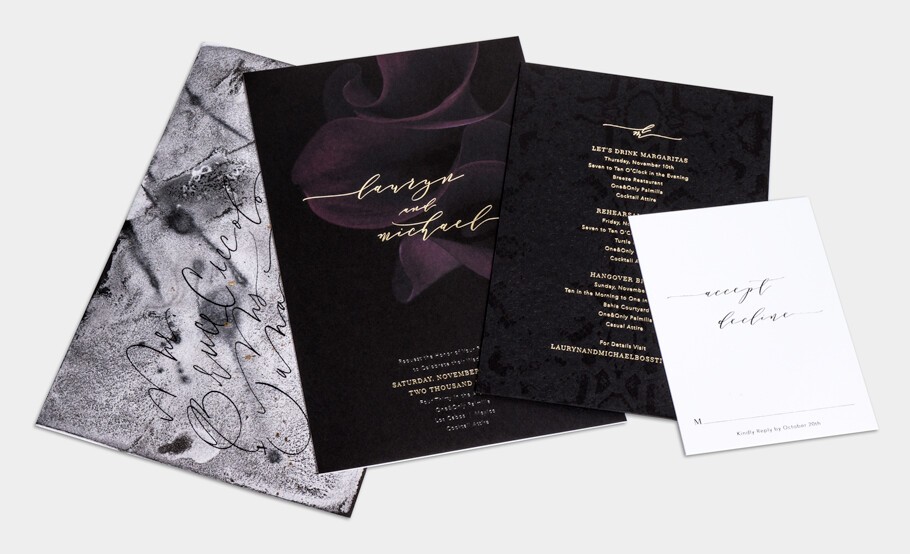
The following examples cover the range from traditional to relaxed. Each is ready to use — adjust names and dates to make them yours.
Formal:
Kindly reply by the first of May
___ Accepts with pleasure ___ Declines with regrets
Name: _______________
Semi-formal:
Please respond by May 1st, 2027
___ Will attend ___ Unable to attend
Name: _______________
Casual:
RSVP by May 1st
___ Wouldn't miss it ___ Can't make it this time
Name: _______________
"Accepts with pleasure / declines with regrets" is formal and correct. "Wouldn't miss it / can't make it" fits a backyard celebration. What reads as charming in a casual context reads as tone-deaf on a black-tie reply card. Match the register of your invitation and hold it through every piece in the suite.
When RSVPs are collected through a wedding website, the mechanics change but the required information stays the same. Guests submit their name, their response, and any additional details through the form — no reply card, no stamp, no mail.
The field labels on an online RSVP form should be brief and clearly named: first and last name, attendance confirmation (yes/no, or a phrased equivalent), number of guests attending if plus-ones are extended, meal choice, dietary restrictions or allergies, and an optional song request line. Every field a guest has to interpret is a field some guests will skip or fill out incorrectly.
For couples collecting RSVPs through online wedding invitations, responses populate a dashboard automatically. The prompt inside the invitation can be simple: "Please respond by May 1st" with the response form built in. For a full breakdown of how online RSVP collection works alongside your digital invitation, see features and pricing.
If your reception includes a plated dinner, collecting meal choices on the RSVP card removes a significant coordination burden later. The format needs to be unambiguous for guests and usable when you hand the responses to your caterer.
For a printed reply card: list each option on its own line with a checkbox or blank line — "___ Beef ___ Chicken ___ Vegetarian" — followed by a dietary restrictions line below. For an online form, use dropdown or radio button selectors rather than open text fields, which produce inconsistent responses that require manual clean-up.
Label meal choices by the actual protein or dish name. "Option 1 / Option 2" tells the caterer nothing and requires a separate reference document to decode. For printed wedding invitations with insert cards, meal choice wording belongs on the reply card, not the main invitation.
Song request lines have become standard on both printed and digital RSVP cards. They give guests something personal to engage with and give couples a working playlist without a separate back-and-forth with the DJ.
For a printed card: "Song request: _______________" is sufficient. For an online form, a slightly more personal prompt works better — "What song will get you on the dance floor?" followed by an open text field. The casual framing fits a digital send. For formal printed suites, the plain "Song request" line is the right call.
The tone of the reply card should mirror the invitation. A formal event calls for formal language throughout — the reply card is not the place to introduce levity if the rest of the suite is traditional.
Formal:
Kindly reply by the first of June, Two Thousand Twenty-Seven
M _______________ ___ Accepts with pleasure ___ Declines with regrets
Meal preference: ___ Beef ___ Salmon ___ Vegetarian
Casual:
RSVP by June 1st, 2027
Name(s): _______________ ___ Yes, we'll be there! ___ Sorry, we'll miss it
Dietary needs: _______________
The "M ___" line is a traditional convention for formal reply cards — guests fill in their title and name (Mr., Mrs., Dr., etc.). It ensures accuracy for place cards and catering records and looks correct on a card with a matching envelope. For informal weddings, a plain "Name" line is cleaner. For full guidance on name and title conventions, see how to address a wedding invitation.
When the invitation is digital and RSVPs are collected online, the wording on the invitation needs to direct guests clearly to where and how they respond. Three formats are common.
A link to the wedding website: "RSVP by May 1st at [wedding website URL]." A built-in digital RSVP through an invitation platform: "Please respond by May 1st" with a response button embedded in the invitation. An email reply: "Kindly respond by May 1st at hello@[youremail].com." The built-in option is the most efficient — guests respond without leaving the invitation, and responses are captured immediately. For couples managing RSVPs across a large guest list, the rsvp wedding websites guide covers the mechanics in detail.
A decline option is easy to overlook when writing RSVP copy, and its absence creates a real problem. Guests who can't attend and find no clear way to decline often don't respond at all, leaving them in the same non-response pile as guests who simply forgot. Always include a decline line on both printed and digital cards.
"Declines with regrets" is correct for formal invitations. "Regretfully unable to attend" works for semi-formal. For casual events, "Can't make it, but wishing you the best" is warm without being clumsy. Include a name line on the decline option — guests who aren't attending still need to be recorded as a confirmed no. For strategies on following up with guests who don't return cards by the deadline, see how to remind guests to RSVP.
The most common error is omitting the reply-by deadline or printing it too small to notice. Guests who don't see a date treat the response as optional. The deadline should be the most prominent piece of information on the card after the response lines themselves.
Leaving out the name field is the second. Blank envelopes returned without names are a persistent problem, particularly when plus-ones are involved. "Name(s)" or "___ of ___ seats confirmed" prompts guests to fill it in correctly. Tone mismatches between the invitation and reply card read as an oversight — not a creative choice. Vague meal choice labels like "Option 1" require a separate document to cross-reference when you're coordinating with the caterer. And omitting the decline option pushes guests who can't attend toward non-response, which corrupts your headcount in the final weeks before the wedding. For more context on the full RSVP process, the rsvp invitations guide covers response conventions and timing alongside wedding invitation ideas for design decisions that carry through to the reply card.
Include a response line, a name field, and a reply-by deadline. For formal events, "accepts with pleasure / declines with regrets" is correct. For casual events, warmer language fits better. Meal choice, dietary notes, and song requests are optional — add them only if you need the information to plan the wedding.
Keep field labels brief and clearly named: name, attendance confirmation, and any additional information you need — meal choice, dietary restrictions, song request. The response prompt can be as simple as "Please respond by [date]" with the form embedded in the invitation or linked from the wedding website. Every additional field is a field some guests will skip.
List each option on its own line with a checkbox or blank: "___ Beef ___ Chicken ___ Vegetarian." Add a dietary restrictions line below. Label options by the actual dish name, not "Option 1 / Option 2." For online forms, use dropdown or radio button selectors rather than open text fields.
"Declines with regrets" is correct for formal invitations. "Regretfully unable to attend" works for semi-formal. For casual events, "Can't make it, but wishing you the best" is direct without being cold. Always include a decline option on the card — guests who aren't attending still need a way to give you a confirmed no.
In tone, yes. A formal invitation calls for formal reply card language throughout. A casual celebration can carry something warmer. The reply card is part of the suite — inconsistency between the invitation and RSVP wording reads as an error. For etiquette guidance across the full invitation suite, see wedding invitation etiquette.
A traditional prompt for guests to fill in their title and name — "Mr. and Mrs. James Anderson," for example. It ensures accurate names for place cards and catering records and is correct etiquette for formal events. For informal weddings, a plain "Name: ___" line is the cleaner option.
Bliss & Bone's online wedding invitations include built-in RSVP collection — guests respond directly through the invitation, and answers appear in your dashboard in real time. For a dedicated hub managing all guest communication, a wedding website collects RSVPs, dietary notes, song requests, and plus-one names in one place, with automatic reminders to guests who haven't responded.